
TREX IPTV not working? First check whether the problem affects your account, one player, a specific channel or the whole service. Test the same account in another compatible player before renewing, reinstalling everything or buying another subscription.
A login failure, an empty playlist and a buffering channel need different solutions. Start with the symptom below, then change one setting at a time so you can see what actually fixes it.
For problems that affect other providers as well, use our complete IPTV not working troubleshooting guide.
Quick Answer: What Should You Try First?
Test one live channel and one movie, then repeat the test in another compatible player. Close the first stream before opening the second, especially if your account allows only one active connection.
| What you see | What to check first | What to do next |
|---|---|---|
| Account details load, but the playlist does not | Whether the same account loads in another player | Use the working player and report the original app failure |
| Channels disappear when you press play | Whether opening a stream triggers a failed playlist refresh | Compare the same account in another player |
| Movies fail, but live TV works | The selected playback engine | Test an external player where supported |
| One channel buffers | Another feed of that channel or programme | Use the working feed and report the failing one |
| Every channel fails | Account details, supplied host and another compatible player | Ask the seller to verify the account and host |
| Login details have not arrived | The order’s account-information section | Contact the seller through the original order |
| Channels play, but the guide is empty | EPG source, current listings and channel mapping | Diagnose the guide separately from playback |
No single adjustment fixes every row. The useful solution is the one that matches the fault you have actually identified.
TREX failing inside Smarters? Use our IPTV Smarters troubleshooting guide to check whether the problem involves the player, account login or playback before replacing your subscription.
Is TREX IPTV Down Today?
A failed stream does not prove that TREX IPTV is down. Check another channel and another compatible player before treating the problem as an outage.
If your account works in one app but fails in another, you have evidence of a player-specific problem. If one channel fails while others play, investigate that feed rather than resetting the entire setup.
Check for an outage without creating more problems
Keep your existing account settings and compare playback before deleting anything. A working comparison is more useful than starting from scratch and losing your original configuration.
- Open a different live channel.
- Test one movie or episode.
- Close the player.
- Test the same account in another compatible app.
- Ask your seller whether your assigned host has an incident.
If the seller confirms an outage, ask whether they have a working replacement host for your existing account. Do not copy an unrelated “TREX server URL” from a public comment and assume it belongs to your subscription.
What if everything fails?
If every test fails, send the seller the exact symptoms and ask them to verify the account against its assigned host. Broad failure alone does not establish whether the account, host or network path is responsible.
Avoid repeated renewals while the cause remains unknown. Buying more subscription time is not a diagnostic test.
TREX IPTV Not Connecting, but Account Information Loads
If your expiry date and account information load but the channel catalogue does not, test another player before changing your credentials. Authentication and content loading are separate parts of the process.
A documented TREX/o3IPTV case followed this pattern: account details loaded, but playlist retrieval failed. The same account reportedly worked in UHF on Mac and Open TV on Windows.
Use another player as a controlled test
Enter the same supplied server address, username and password in the alternative player. Keeping the account unchanged helps show whether the failure is tied to the original application.
- Save your original configuration privately.
- Close the first player.
- Install a compatible alternative from its recognised distribution channel.
- Add the existing account.
- Test a live channel, a movie and an episode separately.
If the alternative works, keep it as a temporary workaround. Report the original app’s version, your operating system and the exact point where loading fails.
Should you reinstall the original app?
Do not make repeated reinstalls your main solution. In the reported o3IPTV case, uninstalling and reinstalling had already failed to resolve the problem.
Preserve the working comparison instead. “This account plays in another app but fails during catalogue loading here” gives support more useful information than “TREX does not work.”
TREX IPTV Playlist Not Loading or Channels Disappearing
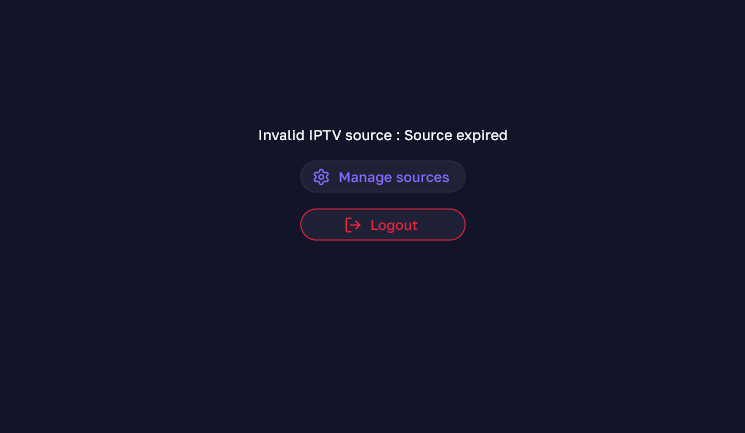
If your channels disappear immediately after selecting a stream, check whether the app is attempting a playlist refresh that then fails. This pattern has been reported with a TREX account in o3IPTV.
The strongest documented workaround for that case was using a different player. It was not a confirmed password reset, router fix or subscription renewal.
Separate a loading failure from an empty account
Check whether the player can still display your account information. Then compare the same subscription in another app without changing the server details.
Record the result clearly:
- Account details load, but no categories appear.
- Categories appear, but opening a channel removes the list.
- Live TV loads, but movies or series do not.
- The catalogue works in another player.
These are different observations. Include the one that matches your setup when contacting the app developer or seller.
Should you switch from Xtream Codes to M3U?
Use another login format only if your seller supplies it and your player supports it. Do not construct a replacement playlist URL from an unverified online example.
An alternative format can be a comparison, but the available TREX case does not establish that switching from Xtream Codes to M3U fixes this particular failure.
TREX IPTV Movies and Series Not Playing
If movies or series fail in an embedded player, test an external playback engine where your app supports one. In an IPTVnator report involving TREX, VLC played on-demand content that the built-in players could not.
Treat this as a playback workaround, not proof that every TREX movie requires VLC. The result depends on your app, operating system and the supplied stream.
Fix for IPTVnator: Test External VLC or MPV
Install VLC or MPV, select it as IPTVnator’s external player, then reopen the same movie or episode. Using the same title makes the comparison meaningful.
- Install the external player.
- Open IPTVnator’s player settings.
- Select the supported external-player option.
- Set the executable location if your installation requires it.
- Restart IPTVnator if the player is not detected.
- Replay the title that previously failed.
If the title now plays, you have a usable workaround. Keep the original failure details if you want the embedded-player problem investigated.
Linux and SteamOS: Check the Player Path
If IPTVnator cannot launch a Flatpak-installed player, check its actual executable path. A participant in the playback discussion reported success using these paths:
textVLC:
/var/lib/flatpak/exports/bin/org.videolan.VLC

MPV:
/var/lib/flatpak/exports/bin/io.mpv.Mpv
Use a path only if it exists on your device. Different installation methods can place the executable elsewhere.
TREX Live TV Not Working in VLC
If movies work in VLC but live channels fail, test live TV separately in the original player. In the reported IPTVnator/TREX setup, VideoJS with the M3U8 setting played live channels when VLC did not.
You may need different playback choices for live and on-demand content. A successful movie test does not prove that the same configuration is right for every live stream.
| Content type | Configuration that worked in the reported case |
|---|---|
| Movies and series | External VLC |
| Live channels | VideoJS with the M3U8 setting |
Apply this only where your player exposes those options. Do not change every stream format or server setting at once.
TREX IPTV Buffering on One Channel
If one channel buffers while the rest play normally, test another supplied feed of that channel before changing your whole network. A single failing feed needs a different investigation from widespread buffering.
A TREX subscriber experiencing RedZone trouble reported finding a working alternative under TSN. That is a specific user-reported workaround, not a guarantee that the same option is available on every account.
How to Test an Alternative Feed
Search your existing channel list for the programme or broadcaster, then compare any relevant alternatives your subscription legitimately includes. Watch long enough to check whether playback remains stable.
Send the failing channel’s exact name and the time of the problem to support. Include the working alternative so they can compare the two sources.
Do not substitute an unrelated channel and call it the same service. A single local game, for example, is not equivalent to RedZone’s multi-game coverage.
TREX IPTV Buffering on Every Channel
If several unrelated channels buffer, compare the player and connection separately. Do not assume that a VPN, DNS change or faster broadband package is automatically the answer.
Start with the same channel in another compatible player. If that works on the same device and connection, focus on the original app before making network-wide changes.
Run a Controlled Connection Test
Keep the player and channel unchanged while comparing your available connection options. If the device supports Ethernet, compare it with Wi-Fi; otherwise, test closer to the router without changing other settings.
Pause large downloads during the comparison and record whether playback improves. A successful comparison narrows the investigation, but it does not prove that every earlier interruption had the same cause.
For a wider device-and-network checklist, return to the main troubleshooting guide.
Should You Increase the Buffer?
A larger buffer may help a player absorb brief interruptions, but it cannot restore an unavailable stream. It also introduces additional playback delay.
If your app offers a buffer setting, make one modest adjustment and replay the same channel. Keep the change only if it produces a repeatable improvement; avoid presenting one buffer value as correct for every device.
Should You Use a VPN?
Do not buy a VPN solely because a troubleshooting article promises it will fix TREX. The research behind these cases did not establish a universal VPN solution.
Resolve the player, account and feed comparisons first. A VPN is not a substitute for a working account or appropriate content authorisation.
TREX IPTV Picture Quality Is Poor
Compare another supplied feed before changing display settings. A higher-resolution label does not, by itself, establish that the source has better picture quality.
If another feed looks better on the same television, player and connection, report the poorer source by its exact channel name. If all content looks poor, keep that separate from a complaint about one broadcast.
Do not expect clearing the app cache or changing DNS to create detail that is absent from the supplied video. The documented TREX complaints did not establish a universal picture-quality repair.
TREX IPTV Login Details Not Working
Check that you have the complete account details before treating the failure as a bad password. An Xtream Codes setup normally uses the supplied server address, username and password together.
Buyers have reported receiving incomplete details, including a username and password without the server address. Others reported credentials that failed, but those reports did not establish one common cause.
Check the Original Order First
Look inside the order’s account-information or delivered-details section before waiting for another email. In a TREX buyer discussion, a participant specifically directed users to an entry such as “Account #1.”
Copy the supplied details carefully and preserve the original message. If a field is missing, request it from the seller rather than substituting information from another website.
Ask the Seller to Verify the Account
If the complete details fail in more than one compatible player, ask the seller to test the account against its assigned host. Include the error text and the time of your test.
Do not post your password or full playlist link publicly. Playlist links can contain account credentials.
TREX Activation or Login Delivery Is Delayed
Check the order’s delivered-account section first, then contact the seller through the original purchase channel. Missing account delivery is a fulfilment issue, not an app setting.
Keep the order reference, payment receipt and promised delivery terms together. If the seller cannot resolve the order, follow the original marketplace’s applicable dispute or refund process.
Do not rely on another buyer’s activation time as a guarantee. The reported delivery and refund outcomes were specific to those purchases.
TREX EPG Not Working or TV Guide Missing
If channels play but the guide is empty, diagnose the EPG separately from streaming. Working video does not prove that current programme listings are available or correctly matched.
An XMLTV guide uses channel identifiers to associate programme listings with channels. Missing data and incorrect matching therefore need different checks.
If the Entire Guide Is Empty
Confirm the guide source supplied for your account, then use the player’s EPG update function. Check whether the player reports a successful update or a retrieval error.
If the source has no current listings, repeated refreshes will not create them. Ask support whether the guide source is available and up to date.
If Only Some Channels Have No Guide
Check the affected channel’s mapping if your player supports manual assignment. The relevant programme data may exist under an identifier that is not matched to that playlist entry.
Do not replace the entire playlist to repair one missing guide entry. First establish whether the problem is limited to that channel.
If Programme Times Are Wrong
Check the device time, timezone and any EPG time-offset setting. Change only the setting relevant to the mismatch, then compare against a programme whose start time you know.
A time-offset adjustment is not the same as repairing a missing guide source. Keep those two problems separate.
TREX Works in TREX Pro but Not Other Apps
Keep the working app while you investigate, but do not assume TREX Pro is universally required. A report with this symptom exists, although a verified resolution was not available.
Ask your seller which login formats and third-party players your account supports. Provide the failing app’s exact name and version rather than requesting a general “TREX fix.”
Avoid unverified user-agent changes, modified APKs or replacement server addresses. None was established as the solution to the reported TREX-Pro-only case.
What to Send TREX Support
Send a reproducible problem report rather than “IPTV not working.” The most useful report identifies the account privately, the failing content and the comparisons you have already completed.
Copy and complete this message:
My TREX account is not working correctly.
Device and operating system:
Player name and version:
Exact error message:
Date, time and timezone:
Affected live channel, movie or episode:
Does account information load?
Does another live channel work?
Does the same account work in another player?
What changed immediately before the problem started?Please verify the account and assigned host, and confirm whether this is an account, source or service incident.
Send credentials only through the seller’s appropriate private support channel. Keep them out of screenshots shared publicly.
Thinking About Changing Your IPTV Service?
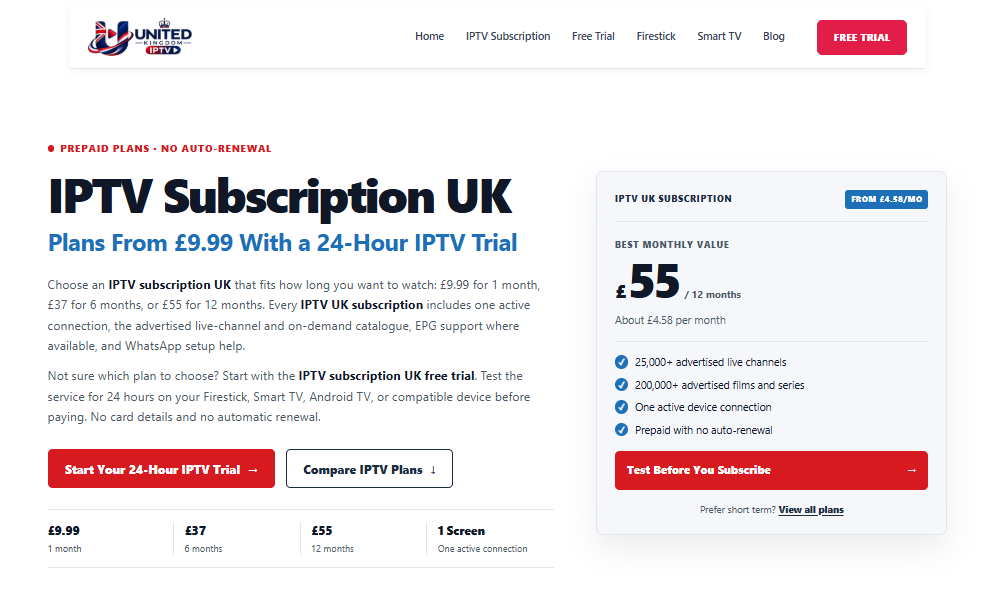
Test an alternative on your normal device before choosing another long subscription. A different account is useful for comparison, but it does not automatically repair the original player or home connection.
You can review our Free Trial IPTV UK offer to check playback, navigation and guide loading on your own setup. Confirm the current trial conditions before requesting access.
Test More Than One Channel
Use the trial to check live TV, a movie, an episode and the guide during your usual viewing hours. Test the categories you actually intend to use rather than judging the service from a catalogue count.
If the setup meets your requirements, compare our IPTV subscription UK plans. Check current pricing, connection limits, support terms and content authorisation before paying.
Check Your Television Setup
Use the device guide that matches your television rather than assuming every Smart TV runs the same apps. Our IPTV for Smart TV UK guide explains the distinction between the player and the content subscription.
A player activation purchase and a streaming subscription are separate transactions. Paying for one does not establish that the other is included.
TREX IPTV Not Working: Frequently Asked Questions
Why Is TREX IPTV Not Working?
The cause may be a player failure, incomplete account details, a failing feed or a service incident. Compare another channel and another compatible player before choosing a fix.
Account information loading while the catalogue fails is different from credentials being rejected. Record the exact symptom rather than treating both as a password problem.
Is TREX IPTV Down Today?
You cannot establish a current outage from one failed channel or an old discussion. Test other content and ask your seller whether your assigned host has an active incident.
If the same account works in another app, investigate the original player before declaring a service-wide outage.
Why Does TREX Work in One App but Not Another?
Players can handle the same account or stream differently. A documented TREX/o3IPTV case worked in UHF and Open TV while failing in o3IPTV.
Use a working player as a temporary workaround and report the failing app’s version and behaviour. Do not assume you need a new subscription.
Why Are TREX Movies Not Playing When Live TV Works?
The playback engine may handle the on-demand stream differently from live TV. In an IPTVnator/TREX report, external VLC played movies and series that embedded players failed to play.
Test the affected title in a supported external player. Retest live TV separately before changing the default for everything.
Why Does TREX IPTV Keep Buffering?
First establish whether one feed or several unrelated channels are affected. An alternative feed can help with a channel-specific fault, while widespread problems require player and connection comparisons.
Avoid changing the player, network and stream settings simultaneously. You need to know which change produced the improvement.
Will Renewing TREX Fix a Loading Problem?
Renew only after confirming that expiry is the cause. A player can fail to load content even when account information shows an active subscription.
If the same account works elsewhere, investigate the failing player before paying for more access.
Can United Kingdom IPTV Repair My TREX Account?
No. TREX account activation, assigned-host changes and billing issues need to be handled by the seller that supplied your account.
Our United Kingdom IPTV service is a separate offer. Test compatibility and review the current terms before considering a different subscription.
Find the Failing Part Before You Replace Everything
Match the solution to the symptom: use a working player for an app-specific failure, compare feeds for a single-channel problem, and contact the original seller for account or host issues.
If you decide to evaluate another service, start with the 24-hour IPTV trial and test your real viewing setup before selecting a longer plan.