
IPTV for Apple TV UK: Apps, Setup & Best Options in 2026
Want to use IPTV on an Apple TV in the UK? This guide explains which tvOS players are worth considering, how to add M3U or Xtream Codes, why TiviMate is not an Apple TV option, how AirPlay fits into the setup, and what to check when IPTV starts buffering.
Short answer: IPTV works on Apple TV through native tvOS players available through the Apple TV App Store. iPlayTV is a strong dedicated option, GSE Smart IPTV Pro is another useful choice, and TiviMate is not a tvOS application.
Apple TV runs tvOS, not Android TV or Fire OS. That means an Android APK is not something you can simply install on the box. The practical approach is to choose an IPTV player built for Apple TV and then add your IPTV credentials inside that application.
There is also an important difference between the player and the service. The player displays your playlists and streams; your IPTV service supplies the account or playlist information.
With our United Kingdom IPTV service, current information includes 25K+ channels, 200K+ movies and series, one active device connection, an Anti-Freeze option, no VPN requirement and customer support. Subscription options currently start at £9.99.
Can You Use IPTV on Apple TV?
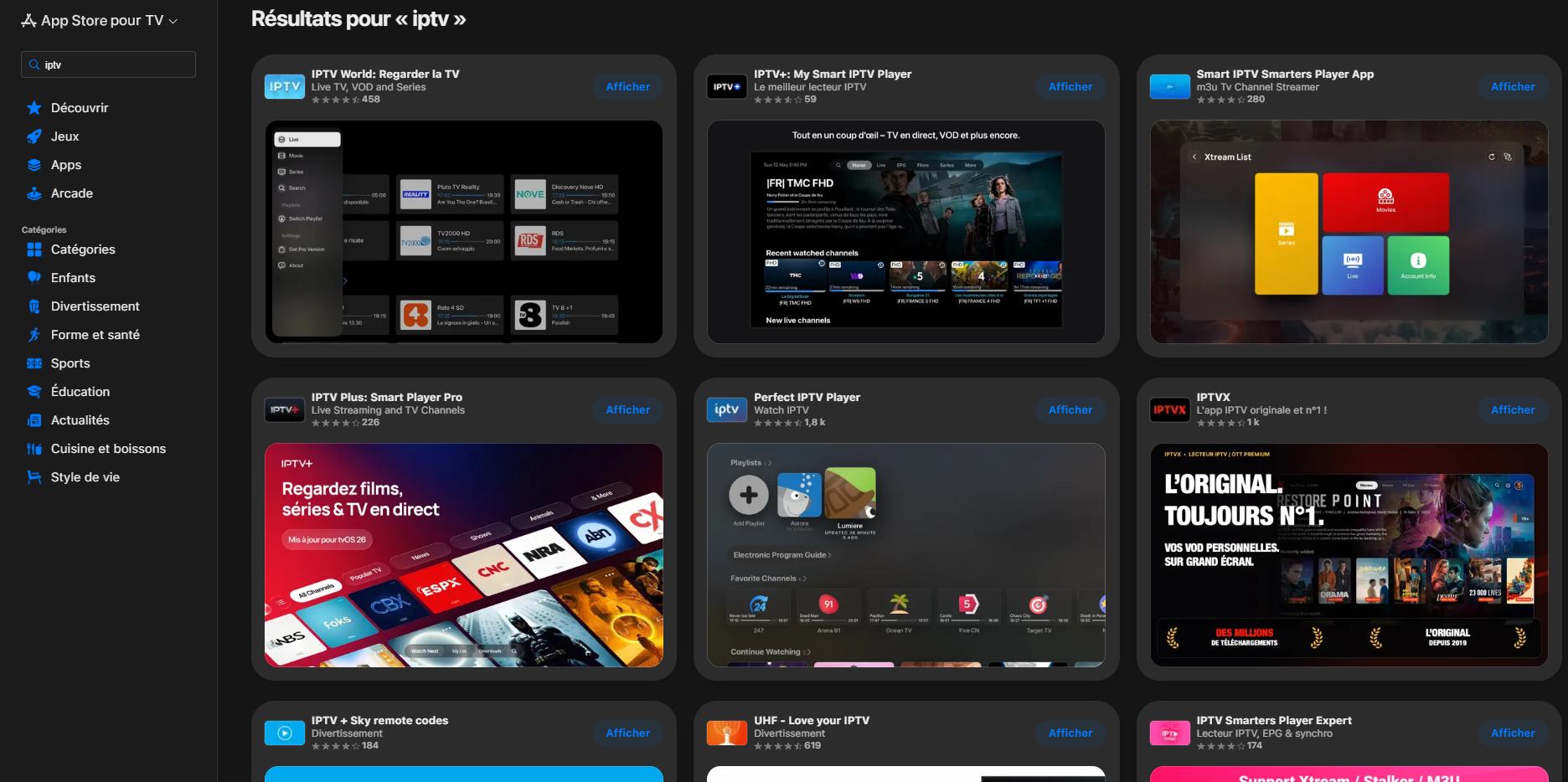
Yes. The normal setup is simple: install a compatible IPTV player from the Apple TV App Store, open it and add the M3U playlist or Xtream Codes login supplied with your IPTV service.
The key limitation is the platform. Apple TV applications have to support tvOS, so an IPTV player made for Android TV cannot simply be copied across.
That is why the app you choose matters more on Apple TV than it might on Android TV, where there are more ways to install applications.
If you are still getting familiar with IPTV itself, our What Is IPTV? guide explains how IPTV services, players and streaming devices fit together.
Which IPTV Device Should You Choose?
Apple TV is excellent when you want a polished tvOS experience, but it is not the same as Android TV, Fire TV or VIDAA. Compare the other setups before choosing hardware or a player.
Which IPTV Apps Work on Apple TV?
The Apple TV App Store is the first place to check. The strongest choices depend on your preferred login format, EPG needs and how much control you want over playlists.
iPlayTV
iPlayTV is built specifically around Apple TV and is a strong option when you want a traditional television interface rather than a mobile app adapted for a large screen.
The current UK App Store listing supports live and VOD playlists, M3U, Xtream Codes, EPG URLs, catch-up, subtitle and audio controls, and frame-rate matching.
GSE Smart IPTV Pro
GSE Smart IPTV Pro is another established option for Apple TV. It supports M3U playlists, Xtream Codes API, EPG features and playlist management tools.
It is worth considering if you manage your playlists from a computer or prefer a player with broader configuration options.
Flex IPTV
Flex IPTV is another Apple TV player to check, particularly if your device runs a recent tvOS version. App compatibility should always be checked against your exact Apple TV software before installing.
VLC
VLC can be useful for testing individual streams and basic media playback, but it is not necessarily the most convenient choice when you want a full IPTV interface with channels, categories and EPG.
How Do the Main Apple TV IPTV Apps Compare?
| Player | Apple TV | M3U | Xtream Codes | EPG | Best suited to |
|---|---|---|---|---|---|
| iPlayTV | Yes | Yes | Yes | Yes | Dedicated tvOS IPTV setup |
| GSE Smart IPTV Pro | Yes | Yes | Yes | Yes | Playlist management and flexibility |
| Flex IPTV | Check current tvOS requirement | Yes | Check current version | Yes | Newer Apple TV software |
| VLC | Yes | Basic playback | No dedicated Xtream workflow | No dedicated IPTV EPG | Testing individual streams |
What Is the Best IPTV App for Apple TV?
There is no universal winner, but iPlayTV is a particularly strong starting point when Apple TV is your main IPTV device.
It feels like a television application rather than a phone interface stretched onto a large screen. That matters when you are moving through a long channel list, opening the EPG or switching between live TV and VOD.
GSE Smart IPTV Pro is worth considering when playlist administration and broader configuration options are more important to you.
If you're deciding between popular Android IPTV players rather than Apple TV players, compare our TiviMate vs IPTV Smarters Pro guide.
Is TiviMate Available on Apple TV?
No. TiviMate is an Android TV-oriented IPTV player and does not have a normal tvOS version.
That means there is no standard process where you download an Android APK and install it on your Apple TV.
If TiviMate is the application you specifically want, an Android-based device such as a Fire TV Stick, Google TV device or NVIDIA Shield is a better fit.
You can also compare the Android-based option in our IPTV for NVIDIA Shield UK guide.
How Do You Install an IPTV App on Apple TV?
Installing a native IPTV application on Apple TV is straightforward.
How Do You Add an M3U Playlist on Apple TV?
An M3U playlist is usually supplied as a URL. The IPTV application reads that playlist and builds your channel list from the stream information it contains.
The address above is only a fictional example. Use the actual M3U playlist supplied with your United Kingdom IPTV account.
The exact menu varies between Apple TV applications, so follow the playlist-import workflow provided by the player you installed.
How Do You Add Xtream Codes on Apple TV?
If the IPTV application supports Xtream Codes, the setup normally uses three fields:
iPlayTV and GSE Smart IPTV Pro both support Xtream-style account connections.
The main advantage is convenience. Rather than saving one long playlist URL, the player receives the server, username and password separately and can organise the content into the categories supported by the account.
How Do You Add EPG on Apple TV?
EPG stands for Electronic Programme Guide. It adds programme names, current broadcasts and upcoming schedules to your channel list.
If your IPTV service provides an XMLTV EPG URL, enter it in the EPG section of your chosen player.
This is only a placeholder. Use the actual guide URL supplied with your account.
Why can an EPG be inaccurate?
- The EPG URL may be incorrect.
- The guide may not have refreshed yet.
- Channel names may not match the guide data.
- The service may not provide data for every channel.
- The player may need an EPG refresh.
Can You Use AirPlay for IPTV on Apple TV?
Yes. AirPlay can be useful when the IPTV player or video source is running on an iPhone or iPad and supports Apple's AirPlay features.
The general setup is:
For regular IPTV viewing, a native Apple TV player is usually more convenient because the application runs directly on tvOS instead of making the phone part of the setup.
Why Is IPTV Buffering on Apple TV?
Buffering is not automatically an Apple TV hardware problem. The network, player, service and individual stream can all affect playback.
Start by checking whether the problem affects everything or only a few channels.
| What you see | What to test first |
|---|---|
| One channel buffers | Try several other channels and categories. |
| Many channels buffer | Check Wi-Fi, Ethernet and the wider network. |
| Everything buffers | Restart Apple TV, router and IPTV application. |
| EPG missing but video works | Check EPG configuration and refresh the guide. |
| App freezes | Restart the app, update tvOS and reinstall if necessary. |
For a broader troubleshooting workflow, see our Why Does IPTV Buffer? guide.
Does Apple TV Have Ethernet?
It depends on the Apple TV model.
Some Apple TV 4K versions include Ethernet while Wi-Fi-only variants do not. Before planning a wired IPTV setup, check the exact model under the Apple TV's device information.
What Are the Best IPTV Settings for Apple TV?
Start with the application's default playback settings. There is no universal buffer size, decoder or DNS configuration that will improve every IPTV setup.
Should you use Ethernet?
When available, Ethernet can be useful for eliminating Wi-Fi instability from the troubleshooting process.
Should you change DNS?
Changing DNS can influence domain resolution, but it does not automatically fix buffering caused by an unstable network or an individual stream.
Should you change playback settings?
Only when you have a specific playback problem. Changing several settings at once makes it much harder to identify what actually fixed the issue.
What Is the Difference Between an IPTV Player and an IPTV Service?
An IPTV player is the application. The IPTV service provides the account, playlist or stream information.
What the app does
The player handles channels, playlists, EPG information, favourites, VOD and playback controls.
What the subscription does
The service provides the account information and streams that the application connects to.
Installing an IPTV player therefore does not automatically give you channels. You still need a compatible IPTV service.
Learn more about the technology in our What Is IPTV? guide.
Should You Choose Apple TV, Firestick or Google TV for IPTV?
The right device depends on the applications you want to use.
| Platform | IPTV app flexibility | Android APK ecosystem | Best suited to |
|---|---|---|---|
| Apple TV | Good native tvOS selection | No | Polished interface + Apple ecosystem |
| Google TV | Broad Android TV selection | Android-based | Wide IPTV player choice |
| Fire TV | Broad Android-based ecosystem | Android-based | IPTV flexibility + Amazon ecosystem |
| NVIDIA Shield | Broad Android TV selection | Android-based | Advanced users and powerful Android TV setup |
If you are choosing an Android TV device specifically for IPTV, our IPTV for NVIDIA Shield UK guide covers that setup in more detail.
Which Other Devices Can You Use With United Kingdom IPTV?
Apple TV is one option, but it is not the only way to use your United Kingdom IPTV account. The best device depends largely on the player you want to run.
What Should You Check Before Choosing an IPTV Service for Apple TV?
The first step is compatibility. You want to know that the service provides the account format your Apple TV player can actually use.
- M3U or Xtream Codes: confirm that your service provides a login format supported by your Apple TV player.
- EPG: check whether an XMLTV guide is available if you want programme information.
- Connection limits: understand how many active devices your subscription allows.
- Support: make sure you can get help with account setup and playback troubleshooting.
- Trial: test the service on your actual Apple TV rather than assuming phone playback guarantees identical television performance.
- Licensing: choose a provider that can explain its rights to distribute the content it offers.
How Does IPTV Compare With Sky TV in the UK?
IPTV and traditional pay-TV services approach television in different ways. IPTV generally relies on an internet connection and a compatible player, while services such as Sky use their own television ecosystem and hardware.
If you're comparing the two specifically for your household, read our IPTV vs Sky UK comparison before making a decision.
Can You Watch International Channels With United Kingdom IPTV on Apple TV?
That depends on the IPTV service and the content included in your account. The Apple TV itself is simply the playback platform.
We have dedicated guides for several international categories:
Is IPTV on Apple TV Legal?
The Apple TV platform and an IPTV player are simply technologies. The legal question depends on the service distributing the content and whether it has the necessary rights.
A player does not automatically make a stream legal or illegal. When choosing a service, look for clear information about the content it distributes and the rights behind that distribution.
If you want the basics of how IPTV works before comparing services, start with: What Is IPTV?
Should You Test IPTV on Apple TV Before Choosing a Longer Plan?
Yes. The most useful test is the one performed on the exact Apple TV, application and home network you plan to use.
Test live channels, switch between categories, open the EPG and check VOD if it is part of your subscription.
Visit our IPTV Free Trial UK page to test the service on your own device.
What Are the Most Common IPTV Questions About Apple TV?
Can you get IPTV on Apple TV?
Yes. Install a compatible tvOS IPTV player such as iPlayTV or GSE Smart IPTV Pro, then add the M3U playlist or Xtream Codes credentials supplied with your IPTV service.
Can you install Android IPTV APKs on Apple TV?
No. Apple TV runs tvOS, not Android TV or Fire OS. Android APK installation is therefore not the normal application method on Apple TV.
Is iPlayTV available on Apple TV?
Yes. iPlayTV is designed for Apple TV and supports common IPTV connection methods including M3U, Xtream Codes and EPG.
Does GSE Smart IPTV Pro work on Apple TV?
Yes. GSE Smart IPTV Pro has an Apple TV-compatible version and supports IPTV playlist and account features.
Is TiviMate available on Apple TV?
No. TiviMate is an Android TV-focused IPTV player and does not have a normal tvOS version. Use an Android-based device if TiviMate is essential.
Can you add Xtream Codes to Apple TV?
Yes, when the selected Apple TV player supports Xtream Codes. iPlayTV and GSE Smart IPTV Pro are examples of players that support this connection method.
Can you add an M3U playlist to Apple TV?
Yes. Use an Apple TV IPTV player that supports M3U and enter the playlist URL supplied with your IPTV account.
Can you use AirPlay for IPTV?
Yes. A compatible IPTV application running on an iPhone or iPad can use AirPlay or screen mirroring with Apple TV. A native tvOS player is usually more convenient for everyday viewing.
Why is IPTV buffering on Apple TV?
Buffering can come from Wi-Fi, the home network, the IPTV application, the individual stream or service-side capacity. Test several channels and use Ethernet when your Apple TV model supports it.
Does Apple TV have Ethernet?
Some Apple TV models include Ethernet while others are Wi-Fi-only. Check your exact model before assuming a wired connection is available.
Ready to Set Up IPTV on Apple TV?
Choose a native tvOS player, add your M3U or Xtream Codes details, refresh the EPG and test several channels on the Apple TV you actually plan to use.
If you specifically need an Android-only player such as TiviMate, consider an Android-based device instead.
Test IPTV With a Free Trial